
https://applingo.tokyo/article/2428
applingo.tokyo
/wp-content/themes/cocoon-master/tmp にある
single-contents.php
content.php
をコピーし、
/wp-content/themes/cocoon-child-master/tmp に貼付け
貼り付けたファイルについて
single-contents.php の以下記述を切り取り
content.php に貼りつける
※WordPressは子テーマに親テーマと同じファイルが存在すると子テーマのファイルを使用する
※masterテーマを変更するとテーマのVerUPで上書きリセットされるためChirdテーマを変更する
  <?php //2023.11.29コメントを投稿のすぐ下に記載する(single-contents.phpからコピペ)?>
	<?php //コメント上ウイジェット
  	if ( is_active_sidebar( 'above-single-comment-aria' ) ): ?>
	    	<?php dynamic_sidebar( 'above-single-comment-aria' ); ?>
  	<?php endif; ?>

  	<?php //コメントを表示する場合
  	if (is_single_comment_visible() && !post_password_required( $post )) {
    		comments_template(); //コメントテンプレート
  	} ?>

  	<?php //コメントフォーム下ウイジェット
  	if ( is_active_sidebar( 'below-single-comment-form' ) ): ?>
    		<?php dynamic_sidebar( 'below-single-comment-form' ); ?>
  	<?php endif; ?>

  	<?php //コメント下ページ送りナビ
  	if (is_post_navi_position_under_comment()) {
    		cocoon_template_part('tmp/pager-post-navi');
  	} ?>
<?php //2023.11.29コメントを投稿のすぐ下に記載する ?>
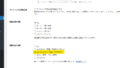
コメント